The Truth About the Ray Ban Meta Gen 2: Pros, Cons, and Verdict
Introduction
The Ray Ban Meta Gen 2 represents an evolution of the smart glasses category that blends traditional eyewear design with connected features: hands-free photo and video capture, on-frame speakers for calls and audio, and companion software that ties the device to a smartphone. For buyers who are curious about wearable tech that looks like everyday sunglasses, the Gen 2 aims to address early criticisms of first-generation smart glasses — but it also raises familiar trade-offs. This article takes a close, practical look at the Ray Ban Meta Gen 2: how it performs in real-world use, what typical buyers care about, and whether it is worth considering as a daily wearable.
Detailed Product Review and Analysis
Design and Comfort
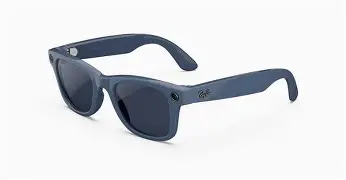
Design is where the Ray Ban Meta Gen 2 works hardest: it positions itself as eyewear first and gadget second. The frames are available in several classic Ray-Ban shapes, and the Gen 2 generally feels more refined than early smart glasses attempts. People who prioritize a natural look will appreciate that the tech is integrated without obvious protruding modules. On the comfort front, the Gen 2 typically feels similar to conventional mid-weight sunglasses. For extended wear, weight distribution and temple stiffness are important considerations — the Gen 2 is designed to be worn for hours, but pocketable cases and removable charging cases influence how often people actually carry them.
Audio and Microphone Quality
Open-ear audio is a staple of this product class: small speakers near the temples deliver sound without blocking ambient noise. The Gen 2 focuses on improving clarity and volume relative to earlier models, making phone calls and podcasts practical for urban commutes and short walks. However, buyers who need immersive, private listening will still prefer earbuds or over-ear headphones. Microphone quality is essential for calls and voice commands; real-world use shows the Gen 2 performs well in quiet environments, but windy or noisy streets can still challenge voice pickup. For meetings or professional recording, a dedicated headset or external mic remains superior.
Cameras and Media Capture
One of the biggest selling points is the ability to capture photos and short videos from a first-person perspective without holding a phone. This is useful for documenting activities where hands are busy — cycling (where laws and safety should be considered), crafting, cooking, or fieldwork. The Gen 2 emphasizes subtle capture and faster responsiveness. In bright outdoor light, photos are typically sharp and usable for social sharing or quick documentation. Low-light and indoor video remain the harder cases for any compact on-frame camera: expect noise, limited dynamic range, and modest stabilization compared to phone-based gimbals. Content creators may find the framing unique and compelling, but those expecting phone-level image quality will be disappointed.
Software, Ecosystem, and Compatibility
The glasses rely on a companion app for setup, media transfer, firmware updates, and feature configuration. The usefulness of the device depends heavily on this software: easy pairing, quick media offload, and responsive updates make day-to-day ownership smooth. The Gen 2 improves on previous software interactions with faster syncs and clearer settings. Compatibility with both iOS and Android is typical, but feature parity can vary across platforms. Buyers should check the companion app’s reviews and update cadence, since a long-lived device needs consistent software support.
Battery Life and Charging
Battery life is a practical constraint for smart glasses. The Gen 2 aims to deliver a full day for mixed use (photo capture, occasional calls, background audio) but heavy recording or long streaming calls will drain the battery much faster. Charging is handled via a case or a dedicated charging accessory; how often the user remembers to charge the case influences the perceived convenience. Real users report that battery management feels similar to other wearables: routine nightly charging is required for daily reliability. For long travel days, users should plan backup power or accept occasional downtime.
Privacy, Safety, and Social Considerations
Smart glasses with cameras invite extra scrutiny. The Gen 2 includes visual indicators and software prompts intended to signal when recording is active, but social etiquette and local laws are still important. Buyers often worry about being perceived as recording without consent; these concerns are valid and should guide where and how the glasses are used. For activities like driving or cycling, safety and legal restrictions may disallow camera use or distract the wearer; the device is best used in situations where recording is unobtrusive and respectful.
Discover deals on Laptops & Computers — updated daily.
See Deals →Optics and Lens Options
Ray-Ban’s core competency is eyewear optics and lens options. The Gen 2 typically supports sunglass lenses, clear lenses for prescription insertion, and polarized variants. For buyers who require corrective lenses, the availability of prescription inserts or lens replacement options is a frequent purchase criterion. Optical clarity and UV protection remain important even when the device’s smart features are the headline. Those who depend on high-precision optics for driving or work should confirm the exact lens specifications offered for their frame choice.
Durability and Everyday Wear
The everyday durability of smart glasses depends on frame materials, hinge quality, and water resistance. The Gen 2 focuses on making these glasses resilient to daily use — pocketing, drops, sweat, and occasional dampness — but they are not built to withstand heavy-duty abuse. Buyers should treat the glasses like premium sunglasses with electronics: protective case storage and mindful handling extend longevity. Warranty terms and service options are worth checking before purchase.
Pros & Cons
- Pros
- Stylish, familiar Ray-Ban frame designs that blend tech into everyday eyewear
- Hands-free photo and short video capture from a natural POV
- Open-ear audio for calls and ambient listening without isolating the wearer
- Improved software integration that simplifies media transfer and device management
- Lens options and accessory choices that support prescription wearers
- Cons
- Image and video quality limited in low light compared to smartphones
- Battery life can be a limiting factor for heavy recording or long days
- Audio leakage and limited privacy for listeners in quiet environments
- Potential social and legal concerns around recording in public or private spaces
- Higher cost than non-smart sunglasses with additional maintenance considerations
How It Compares: Gen 2, Gen 1, and Competing Smart Glasses
| Feature | Ray Ban Meta Gen 2 | Ray Ban Stories / Gen 1 | Bose Frames (audio-first) |
|---|---|---|---|
| Design & Fit | Classic Ray-Ban shapes with subtle tech integration | Similar Ray-Ban styling but earlier hardware footprint | Audio-forward frames, often chunkier temple design |
| Audio | Improved open-ear clarity for calls and media | Good for ambient audio but less refined | Very good audio quality; tuned for music and calls |
| Camera & Capture | Practical first-person capture for daily moments | Introduced the feature; competent in good light | No camera |
| Battery | Daytime mixed-use; depends on recording patterns | Comparable; early models often needed frequent charging | Long battery for audio-only use |
| Use Case | Balanced: capture + audio + style | Early adopter capture + style | Audio-first users who want sunglasses and music |
Buying Guide: What Buyers Should Consider
1. Clarify Primary Use Cases
Buyers should start by asking: will these be worn primarily for style, audio, hands-free capture, or a mix? If the priority is premium audio or long listening sessions, traditional headphones may be a better fit. If the priority is documenting experiences hands-free or quick social sharing, the Gen 2 provides a convenient form factor.
2. Test Comfort and Fit
Comfort matters because glasses are a tactile accessory. Checking for pressure points at the nose and behind the ears, trying the frames on with everyday movement, and confirming the weight feels balanced can prevent buyer’s remorse. Prescription wearers should test optical inserts or discuss options with an optician before committing.
3. Evaluate Camera and Audio Performance in Context
Photographing and recording in the settings buyers frequent is more telling than lab numbers. Try a quick video sample in a low-light indoor setting and in bright outdoor light to understand limitations. Make a call while walking near traffic to assess microphone pickup and ambient noise handling. These real-world tests reveal trade-offs between convenience and quality.
4. Check Compatibility and App Experience
Confirm that the companion app supports the buyer’s phone platform and that it offers the features they need — quick media transfer, firmware updates, privacy controls, and easy sharing. App reviews and update frequency offer insight into long-term support. Buyers who rely on certain social platforms should verify how easily captured content can be exported or shared.
5. Consider Battery Habits and Charging Workflow
People who travel or work long shifts should evaluate how the charging case integrates into daily routines. If nightly charging is acceptable, the device will fit most lifestyles. If constant availability is required for recording long events, consider backup power strategies or alternative gear.
Find top-rated Laptops & Computers products at great prices.
View Offers →6. Understand Privacy and Local Laws
Always consider the social and legal environment. Some venues have explicit rules about recording. In many places, it’s legal to record in public, but cultural norms and private property rules vary. Buyers should be mindful of visible recording indicators and be prepared to explain the device's purpose in social situations.
7. Warranty, Support, and Repair
Electronics embedded in eyewear introduce additional repair considerations. Check warranty coverage for both the frames and the electronics, the availability of replacement lenses or temples, and the manufacturer’s service process. Local repair options or straightforward mail-in service can make ownership considerably less stressful.
8. Alternatives to Consider
If the Gen 2’s balance of features does not match needs, alternatives include audio-first smart frames (for better music and calls but no camera), smartphone gimbals and action cameras (for superior image quality), or a hybrid approach where a lightweight wearable augments a phone for specific tasks. Comparing these options against the cost of the Gen 2 will clarify value.
Real-World Use Cases
The Gen 2 shines in everyday scenarios where hands-free capture or quick interactions matter. Examples include:
- Travel and sightseeing: Capturing candid moments without pulling out a phone makes the experience feel less staged and preserves the moment from the wearer's viewpoint.
- Commuting: Quick calls, listening to podcasts, and recording short clips during breaks are practical uses — though safety should guide any use near traffic.
- Content creation for social platforms: First-person footage can add authenticity to short-form content, making the device attractive to creators who prioritize POV perspectives.
- Work in the field: Technicians, inspectors, or educators who need to document environments hands-free can benefit from immediate capture and on-device playback.
- Accessibility: People with limited mobility or dexterity can use voice commands and hands-free capture to interact with digital content more easily.
Conclusion
The Ray Ban Meta Gen 2 is an appealing step forward for consumers who want smart features without sacrificing the look of traditional eyewear. It balances style, convenience, and modest improvements in audio and capture compared with earlier generations. For everyday moments, travel, and light content creation, the Gen 2 offers compelling convenience. However, it is not a replacement for dedicated cameras or high-fidelity audio systems, and buyers must weigh battery limits, image quality in challenging light, and privacy considerations against the convenience of always-wearable tech. For those who prioritize subtlety and hands-free capture, the Gen 2 is a strong contender; for buyers whose needs center on image fidelity, immersive audio, or extended battery life, complementary or alternative devices may be a better match. Ultimately, the decision comes down to how much value the user places on blending technology seamlessly into everyday eyewear.